BarTender用VB代码打印提示打印次数并显示

Posted by 每天要好心情哦,我的朋友 on January 28, 2026

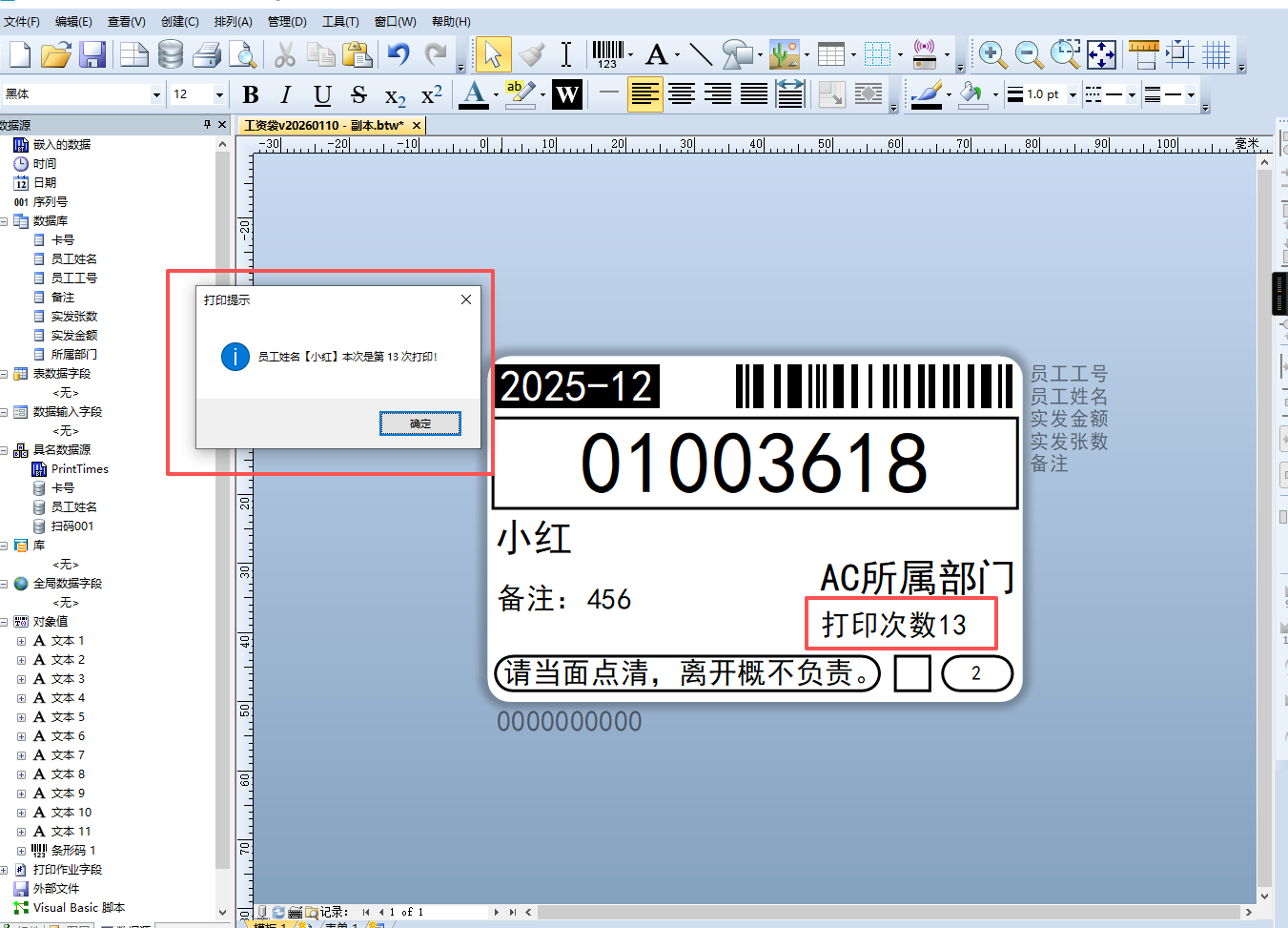
扫码自动打印+重复打印弹窗提示+标签显示打印次数

vb代码示例

1
2
3
4
5
6
7
8
9
10
11
12
13
14
15
16
17
18
19
20
21
22
23
24
25
26
27
28
29
30
31
32
33
34
35
36
37
38
39
40
41
42
43
44
45
46
47
48
49
50
51
52
53
54
55
56
57
58
59
60
61
62
63
64
65
66
67
68
69
70
71
72
73
' 纯VB实现:打印日志记录 + 重复打印弹窗提示 + 打印次数显示在标签
Dim strCode, logPath, fso, ts, line, printCount, currentCount, inputValue
On Error Resume Next ' 捕获异常,避免打印中断

' ************************* 仅需修改这1处 *************************
' 日志TXT保存路径(建议简单路径,无中文/空格)
logPath = "C:\print_log.txt"

' ========== 多方式兜底获取员工姓名(解决为空问题) ==========
' 方式1:从打印提示输入框直接获取(最稳,适配扫码/手动输入)
strCode = ""
On Error Resume Next
strCode = Input.PromptValues("员工姓名").Value ' 读取提示输入的员工姓名
On Error GoTo 0

' 方式2:备用(如果方式1为空,从NamedSubStrings获取)
If Trim(strCode) = "" Then
    strCode = Format.NamedSubStrings("员工姓名").Value
End If

' 方式3:终极兜底(手动弹窗让用户输入,修正提示文字为“员工姓名”)
If Trim(strCode) = "" Then
    strCode = InputBox("请输入员工姓名:", "员工姓名输入", "")
End If

' ========== 校验:员工姓名仍为空则终止 ==========
If Trim(strCode) = "" Then
    MsgBox "未获取到员工姓名!无法记录日志", vbCritical, "错误"
    Exit Sub
End If

' ========== 统计打印次数 ==========
' 初始化打印次数
printCount = 0

' 读取日志统计次数
Set fso = CreateObject("Scripting.FileSystemObject")
If fso.FileExists(logPath) Then
    Set ts = fso.OpenTextFile(logPath, 1, False, -1)
    Do Until ts.AtEndOfStream
        line = Trim(ts.ReadLine())
        If line = strCode Then
            printCount = printCount + 1
        End If
    Loop
    ts.Close
End If

' 计算本次打印次数(核心:用于弹窗+标签显示)
currentCount = printCount + 1

' ========== 新增核心代码:把打印次数赋值给Bartender变量(供标签调用) ==========
Format.NamedSubStrings("PrintTimes").Value = currentCount

' ========== 重复打印提示(第二次及以后) ==========
If printCount >= 1 Then
    MsgBox "员工姓名【" & strCode & "】本次是第 " & currentCount & " 次打印!", vbInformation, "打印提示"
End If

' ========== 写入日志 ==========
Set ts = fso.OpenTextFile(logPath, 8, True, -1)
ts.WriteLine(strCode)
ts.Close

' 释放资源
Set ts = Nothing
Set fso = Nothing

' 异常提示
If Err.Number <> 0 Then
    MsgBox "脚本执行错误:" & Err.Description, vbCritical, "错误"
    Err.Clear
End If

image

模板示例文件 https://wwbda.lanzouv.com/i4qq83h6xq9a